1. Logging Into Your Account

- Go to the website and click “Login” in the header or footer menu.
- Enter your email address and password.
- If you’ve forgotten your password, click “Lost your password?” to reset it.
2. Dashboard Overview
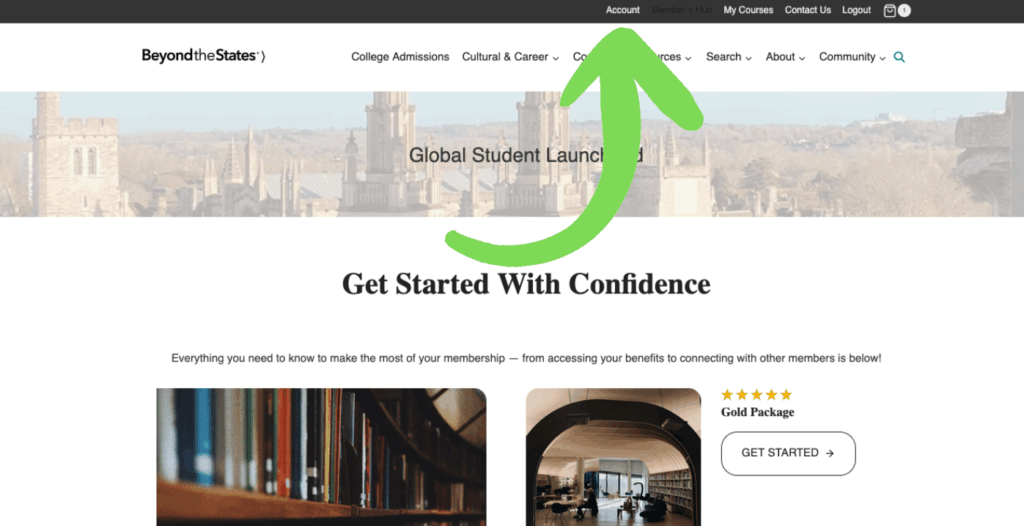
Once logged in, you’ll see the Member’s Hub dashboard. From here you can click the Account link at the top and access:
- Orders – view past orders, check order status, or download invoices.
- Subscriptions (if applicable) – see active subscriptions, renewal dates, and payment methods.
- Downloads – access any digital products or course files included with your purchase.
- Addresses – update billing and shipping addresses.
- Account details – change your name, email, or password.
3. Managing Orders
- Click “Orders” to see your purchase history.
- To view order details, click “View” next to the order.
- If available, you can re-download files or re-order products.
4. Subscription Management (if subscriptions are enabled)
- Go to “Subscriptions” in your account menu.
- Here you can:
- See renewal dates and amounts.
- Update your payment method.
- Cancel a subscription (if allowed).
- To update billing details, click “Change Payment” and enter your new card information.
5. Updating Addresses
- Click “Addresses” in your account menu.
- Edit your billing and shipping addresses.
- Always keep these up to date for smooth delivery and billing accuracy.
6. Editing Account Details
- Go to “Account details.”
- Update your name, display name, email, or password.
- Save changes before leaving the page.
7. Logging Out
When finished, click “Logout” from the My Account page for security.